

Three Burp Suite Walkthroughs in the Homelab
IDOR, insecure file upload, and credential stuffing — three OWASP Top 10-class vulnerabilities, demonstrated against intentionally vulnerable apps running in my own homelab, using Burp Suite Community.
I set up DVWA, Juice Shop, and bWAPP in Docker on a small lab server and ran through three classic web-app vulnerability classes with Burp Suite Community. Here's the setup, then the three walkthroughs.
Setup
You can find the vulnerable web applications here, along with documentation on how to deploy them:
- DVWA — official GitHub repo
- OWASP Juice Shop — project page, links to the GitHub repo and a one-click deploy
- bWAPP — official download page (itsecgames.com)
Burp installs easily — apt install burp on Ubuntu, or grab it from portswigger.net for Windows/Mac. My lab box runs Ubuntu Server on a small mini PC, with DVWA, Juice Shop, and bWAPP running as Docker containers.
To get Burp actually intercepting traffic:
- Start a temp project and confirm the proxy host is set to
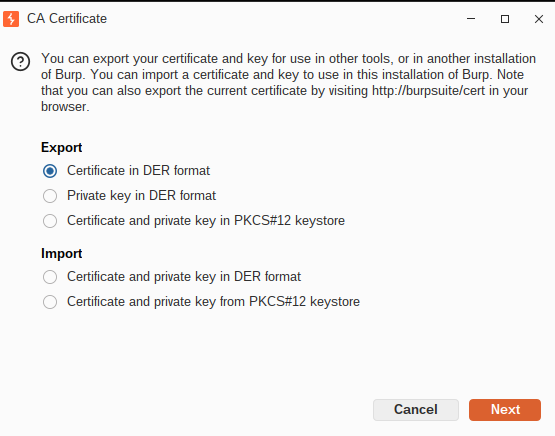
localhost:8080. - Export Burp's certificate from the proxy settings and import it into Firefox's certificate store — this stops constant MITM warnings when trying to load browser pages.
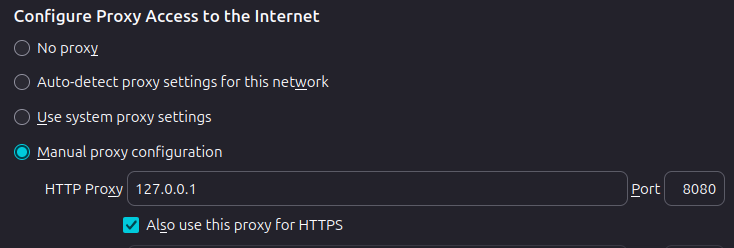
3. In Firefox settings, search "proxy settings", and configure the manual proxy to point at Burp Suite.
4. The Traffic should now show up in Burp's HTTP proxy. With Firefox pointed at Burp, everything comes through, so filter results down to just the target address to cut the noise.
5. Important: set the project Scope to the target address/URL, then go to Proxy Settings → WebSocket Interception Rules and enable "Only intercept in-scope messages." Skip this and Burp intercepts all your other web traffic too, not just the lab target.
IDOR / Broken Access Control — Juice Shop
IDOR (Insecure Direct Object Reference) is a form of Broken Access Control — OWASP Top 10 category A01 — where an app exposes object identifiers (like a basket ID) and fails to check that the logged-in user is actually allowed to access them. Change the ID in the request, and you can see — or touch — someone else's data.
Walkthrough:
- Log into Juice Shop with any account, add a couple of items to the basket, then view it.
- In Burp's HTTP history, find the
GETrequest to/rest/basket/X, whereXis your basket ID. - Right-click → Send to Repeater.
- In Repeater, change the basket ID (
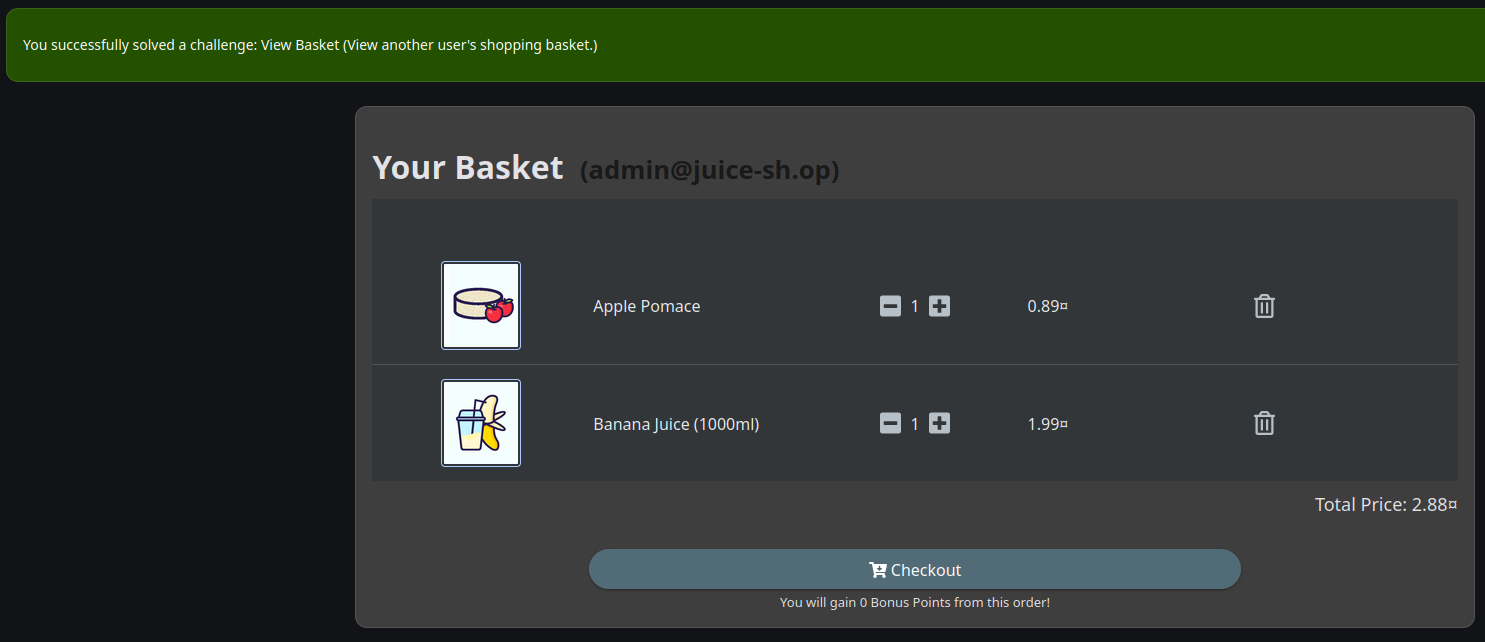
/rest/basket/1→/rest/basket/2,/3, etc.) and hit Send. - The response comes back with another user's basket contents — IDOR confirmed.
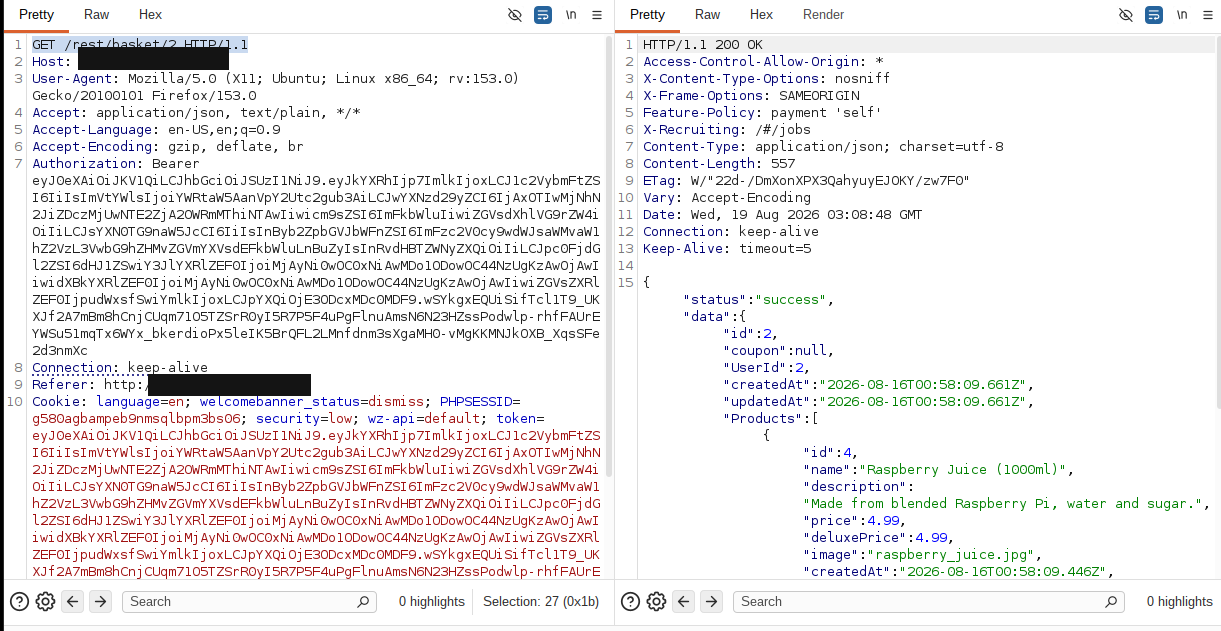
Worth noting: this pulls the data through the API directly. The Juice Shop page itself won't visually update to show the other basket, since the frontend is still keyed to your original session's basket ID in sessionStorage. The vulnerability is real; the UI just doesn't reflect it.
A basket ID is a low-stakes example. The same flaw in a banking or healthcare app — applied to account numbers, order history, or medical records instead of a shopping cart — is a very different conversation.
Mitigations (OWASP IDOR Prevention Cheat Sheet):
- Enforce an authorization check on every request involving an object — never trust an ID the client sends you.
- Scope database queries to the authenticated user's own resources ("give me my basket") instead of accepting an arbitrary ID and fetching whatever matches.
- Use unpredictable identifiers (UUIDs) instead of sequential numbers as defense-in-depth — though OWASP is clear this doesn't replace the authorization check itself, it just makes blind enumeration harder.
Insecure File Upload — DVWA (Low Security)
Walkthrough:
- Log into DVWA with default credentials and set the security level to Low.
- Go to the File Upload page, turn on Intercept, and upload a normal image (a
.png). Forward it through so you get a baseline successful upload. - Try a second upload, this time sending it to Repeater instead.
- In Repeater, change the filename in the
Content-Dispositionheader from the original image name toshell.php— leave theContent-Typeasimage/pngand the file body untouched. - Send it.
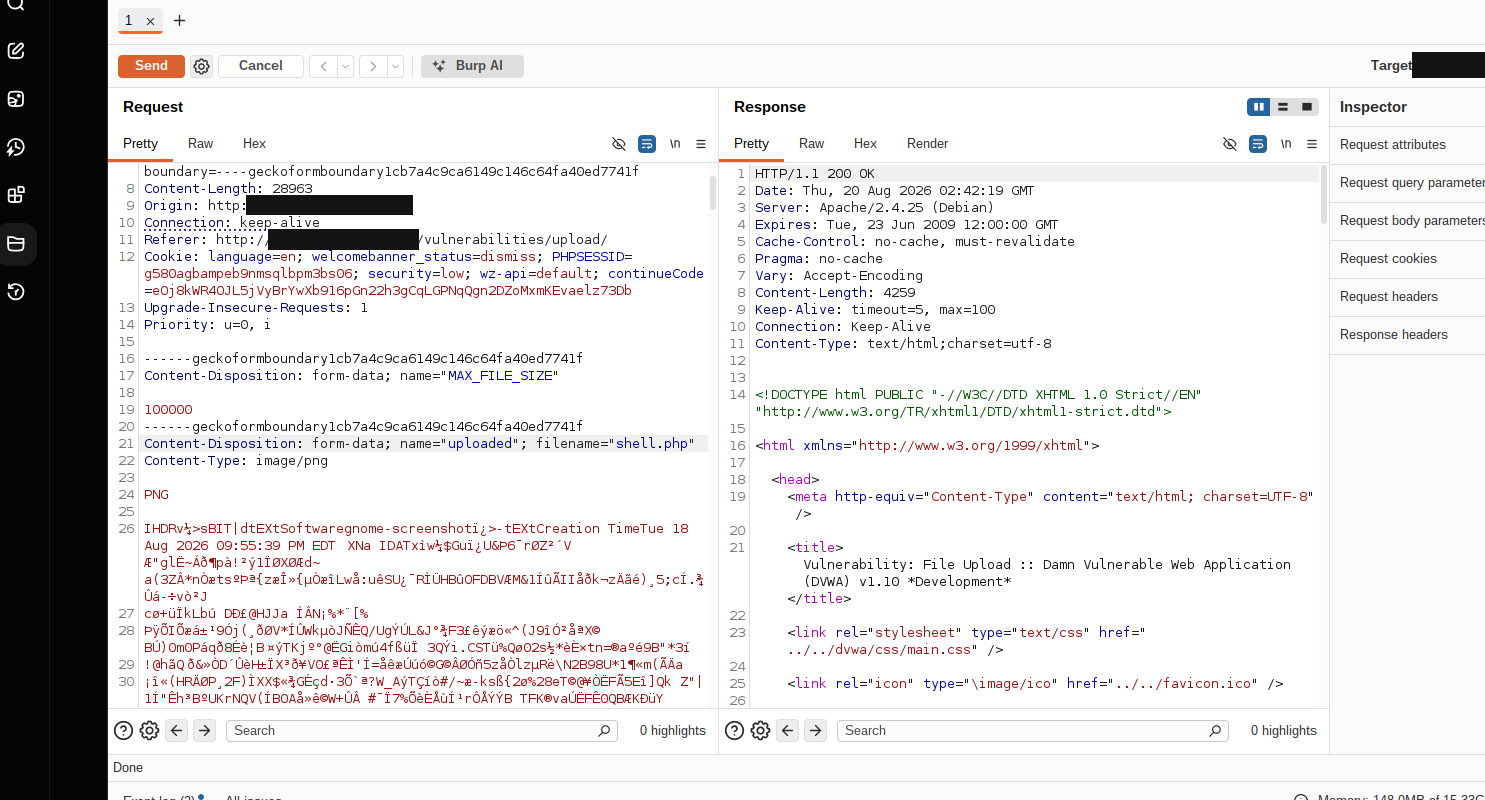
Result: the server responds 200 OK, with a message confirming the file was uploaded to ../../hackable/uploads/[filename].php. The file is actually stored there and reachable at that path — the application accepted a dangerous extension because it only checked the Content-Type header, which the client controls, not the actual file.
Why it matters: this happens when an app trusts the filename or Content-Type a user supplies instead of validating what the file actually is. Trick it into storing an executable file — a PHP web shell, in this case — and an attacker can run commands, read or modify files, and potentially take over the server. I renamed a harmless image here, but swap in real PHP code and the same process hands over remote code execution.
Mitigations (OWASP File Upload Cheat Sheet):
- Validate the actual file content server-side — check file signatures (magic bytes), not the filename or
Content-Typeheader the client sends. - Use a strict allow-list of permitted extensions rather than trying to block dangerous ones.
- Rename uploaded files to something the application generates (a UUID, say), not whatever the client called it.
- Store uploads outside the web root, or on a separate host entirely, so they can't be directly executed even if something slips through.
- Disable script execution in the upload directory as a second layer of defense.
Credential Stuffing — bWAPP
Walkthrough:
- On the bWAPP login page, turn Intercept on and submit a login attempt with any test credentials.
- Right-click the intercepted request → Send to Intruder, then turn Intercept back off.
- In Intruder's Positions tab, clear the automatic markers, then manually mark the username and password fields.
- Set the attack type to Cluster bomb (tries every combination of the two payload sets against each other).
- Under Payloads: load a username wordlist into Payload set 1, a password wordlist into Payload set 2. You can simply create a password.txt, and username.txt with 5 entries each for this step.
- Click Start attack.
Result: most attempts come back with similar response lengths and failed-login status codes — easy to spot as noise. One combination — bee / bug — stands out with a 302 status and a noticeably shorter response length: a successful login against bWAPP's default credentials.
Why it matters: credential stuffing automates huge numbers of login attempts using lists of common or previously leaked username/password pairs. Without defenses in place, weak or default credentials get found fast. It's an old attack, and it's still one of the highest-impact ones against authentication systems, because it doesn't need a software vulnerability at all — just bad credential hygiene somewhere.
Mitigations (OWASP Credential Stuffing Prevention Cheat Sheet):
- Multi-factor authentication is, by a wide margin, the best single defense here — OWASP cites research suggesting it would stop the vast majority of account-compromise attempts.
- Where MFA isn't universal, layer other defenses: account lockout or escalating delays after failed attempts, rate limiting by IP, and CAPTCHA on high-risk login attempts specifically (not on every login).
- Monitor and alert on unusual volumes of failed logins, and never ship default credentials into production.
The Takeaway
None of these three required finding a novel bug. An unchecked ID, a trusted filename, and a default password — all three are configuration and validation failures, not clever exploits. That's actually the useful part of running this kind of lab yourself: it makes clear how much of real-world security work is making sure the boring, obvious checks are actually in place, not chasing zero-days.
Sources
- OWASP. A01:2021 – Broken Access Control. OWASP Top 10.
- OWASP Cheat Sheet Series. Insecure Direct Object Reference Prevention Cheat Sheet.
- OWASP Cheat Sheet Series. File Upload Cheat Sheet.
- OWASP Cheat Sheet Series. Credential Stuffing Prevention Cheat Sheet.