

TrendyCafe: One Mistyped Address, a Keylogger, and a Crypto Miner
A single typo in a web address was enough to put credential-stealing malware on a small café's computers. Here's the cleanup, and the layered defenses that would have stopped it.
Author's Note: The following is a hypothetical breach scenario, generated to reflect realistic patterns seen in real-world incidents. This writer was given limited information relative to the scenario, and challenged to provide recommendations as a tabletop exercise. Names, companies, and details are fictional; however, the mistakes are common, and the solutions are real.
Introduction
This is a case report based on a hypothetical malware attack against a small business that resulted in operational disruptions and exposure of sensitive data. The purpose of this report is to provide an incident analysis, an evaluation of countermeasures, and recommendations from my point of view as an IT consultant hired by "TrendyCafe" in response to the incident.
Incident Analysis
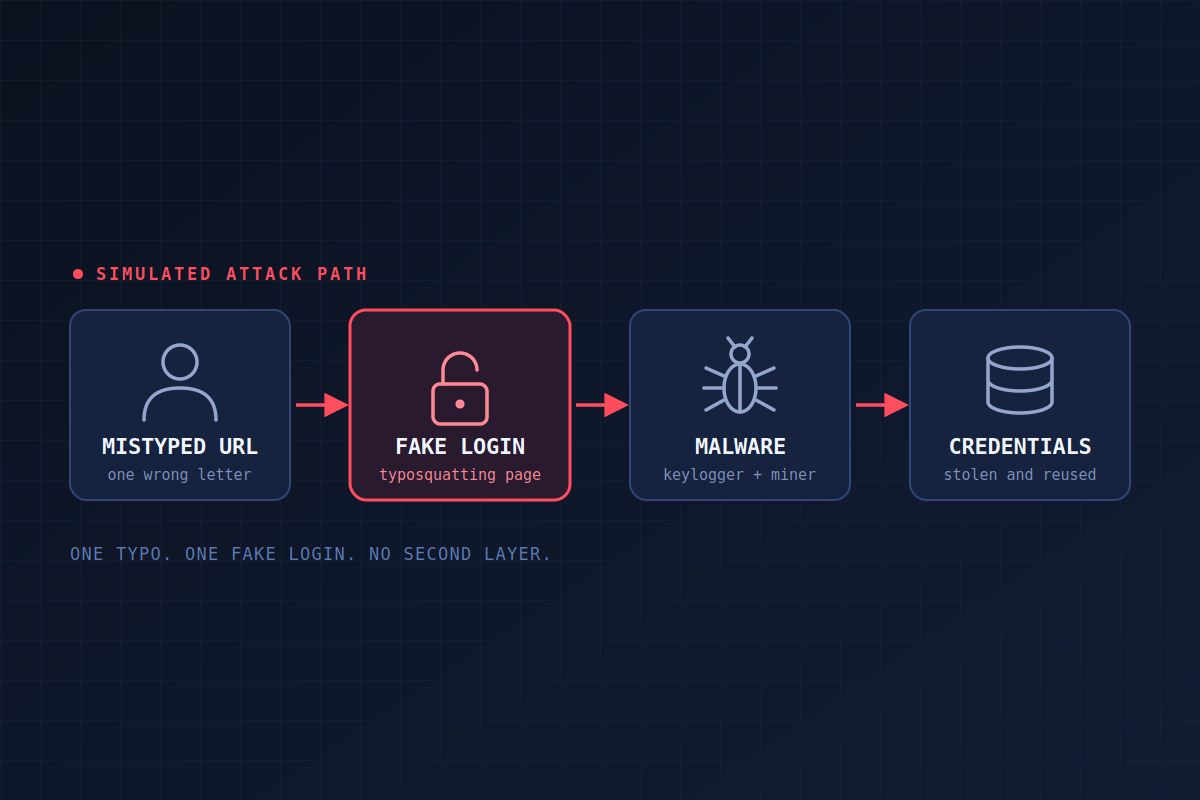
Yesterday, I was contacted by the owner of TrendyCafe after they began experiencing abnormal behavior on several desktops at the business. When I arrived, the owner told me employees had begun noticing slow PC performance the day before. I isolated the workstation of the employee who first noticed the slowdown, and after looking through the logs and running processes, I found that malware was active on the system. It was most likely a combination keylogger-infostealer and Bitcoin mining malware, and the miner would explain the sluggish machines.
Further investigation through logs and browser history showed that the infection began when an employee mistyped a popular web address and landed on a malicious typosquatting page. Its login form was designed to steal credentials and deliver malware when the login button was clicked. After that, I removed the malware from all systems and directed employees to immediately change their credentials for the online platform and for any website where those credentials were reused. I also told management to consult their attorney about the data breach and their responsibilities under law regarding any customer data that may have leaked.
Cleanup is only half the job. The bigger question is what would have stopped this in the first place.
Countermeasures and Defense Tool Evaluation
Malwarebytes
Some type of endpoint detection would play a critical role in preventing this kind of incident in the future. Because the target in this scenario is a small business, complicated or expensive client/server systems aren't viable. I believe a tool like Malwarebytes Premium (paid subscription) would be an excellent fit. It provides real-time protection against malicious sites and scans downloads as they arrive to stop malware from being downloaded and executed, and its Browser Guard extension comes with the subscription. It can also scan the system regularly to catch anything that slips through the cracks. It is a second layer of protection on top of Windows Defender, which in this scenario (as it sometimes does) missed the execution of a malicious file. At only $399 a year for up to 10 machines, a tool like this would go a long way as part of a layered approach. It is also easy to implement for a business without an IT department or the budget for enterprise-grade EDR.
DNS Filtering
Implementing a DNS filter with blocklists would add another layer of protection against malicious websites. This can be done in a few ways. Changing the upstream DNS on the network's default gateway could drastically reduce exposure to malicious domains. That means switching the network's DNS from Google or Cloudflare to a filtering service like AdGuard DNS. Depending on the router make and model, custom DNS blocklists can be configured from .txt files. Those lists are updated regularly, so some maintenance is required to keep them current.
Alternatively, DNS and/or DHCP could run on inexpensive equipment like a Raspberry Pi or a mini PC, using AdGuard in a Docker container. That would allow automatically updated blocklists and upstream DNS control from a single dashboard. Maintained lists like jarelllama's scam blocklist are refreshed daily and are built to catch newly created scam and phishing domains, including typosquatting variants.
Browser Extensions
To add one more layer, a reputable content-blocking extension like uBlock Origin could be used. It blocks more than ads. It also blocks malicious domains in real time. One caveat: the full version of uBlock Origin no longer runs in Chrome. It still works in Firefox, and Chrome users can install uBlock Origin Lite, which is more limited.
User Education
Beyond technical solutions, user education is key. A short session on general internet safety, password hygiene, and malware/phishing resistance is advisable. Employees should get guidance on recognizing phishing and malware sites and on reading the address bar carefully before entering credentials or clicking links. A padlock or valid certificate doesn't prove a site is legitimate, since malicious sites can have one too. They should also learn about typosquatting as a technique and always confirm they typed the domain correctly. Employees must make good decisions, even when controls are in place.
Recommendations
My recommendations for TrendyCafe are to purchase a Malwarebytes small business subscription and install it on devices for real-time protection and automatic malware scans. I would also advise a short training session on safe browsing, and I'd distribute instructions for installing uBlock Origin (or uBlock Origin Lite on Chrome) in their browsers.
I would also install a small mini PC running Ubuntu Server with Docker and use AdGuard for DNS. The service would have its own IP address, configured on the network gateway as the default DNS. This adds another layer of malicious-domain blocking with blocklists that update automatically. Finally, I would advise the owner to enforce strong passwords and a password change policy on any system holding customer data, such as SaaS, email, or cloud platforms that employees use.
Takeaway
Implementing the steps above doesn't erase the damage done by the initial attack. That said, as the person called in to respond, my job is to find the root cause, limit the damage, and bring solutions that keep the same type of incident from happening again. With these changes, TrendyCafe will have greatly reduced its exposure to malware and malicious domains.
The larger lesson is that no single tool would have stopped this. One typo got past Windows Defender. Endpoint protection, DNS filtering, a browser blocker, and a trained employee each give the next mistake a second chance to be caught.
Sources
- AdGuard DNS. (2026). Connect to public AdGuard DNS server.
- jarelllama. (2026). Scam-Blocklist: Blocklist for newly created scam, phishing, and other malicious domains. GitHub.
- Malwarebytes Inc. (2026, July 6). Malwarebytes Premium: All-in-one real-time protection.
- uBlock Origin. (n.d.). uBlock Origin: Free, open-source ad content blocker.