

Field Notes: A Quarterly Nmap and Nessus Audit, and the Testing Plan Behind It
Disclosure: This article is written as an internal guide for a fictional company to help illustrate real-world use., "OrangeTop Systems" (OTS), a made-up mid-sized engineering firm preparing for U.S. Department of Defense contracts. The company, hostnames, and policy timelines are hypothetical. Sample scan output has been edited for brevity. Only scan networks you own or have written authorization to test.
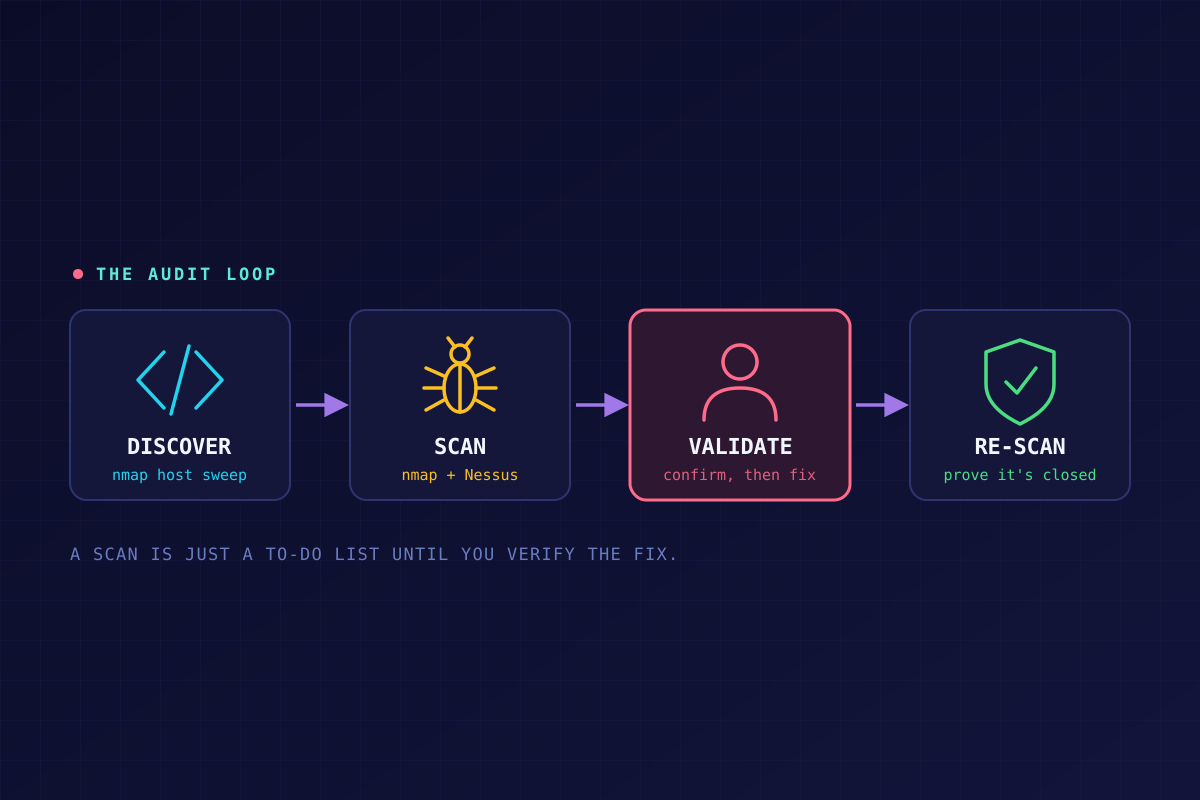
A scan is only as useful as what you do with the results. Here's the whole loop for a small INFOSEC team: find the hosts, find the holes, prove they're real, fix them, and scan again.
Overview of Security Audits
It is essential to our security posture that all network hosts be identified through regular scans, and any vulnerabilities uncovered are mitigated. The following information is intended as a guide to conduct network enumeration and vulnerability scans, including the tools involved.
Tools
Nmap is an open-source, CLI tool used for network discovery, port scanning, service/version detection, and vulnerability assessment used to evaluate network host security.
Nessus is a vulnerability scanning tool that identifies security risks, misconfigurations, and potential threats in IT systems by performing comprehensive scans and providing detailed information.
Conducting a Security Audit
Nmap
For host discovery only
nmap -sn [IP address/CIDR]
-sntriggers host discovery without doing any port scanning.- Useful in identifying network hosts as a standalone task.
Vulnerability scanning, port scanning, and OS detection
For quarterly scans, it is recommended that OS/service detection, port scanning, and vulnerability scanning be conducted using one command on a dedicated VM, and the results saved to an output file for review.
sudo nmap -sV -O --script vuln [IP address/CIDR] -oN scan_results.txt
-sVis used for service detection.-Ois used for OS detection.--script vulnruns the scripts in Nmap'svulncategory, which check for specific known vulnerabilities.- The CIDR notation scans all addresses in the range.
-oN scan_results.txtwrites the results to a text file in the current directory (XML output can also be generated).- For help or additional options, use
nmap --help.
A few notes on that command:
- Ports. With no
-poption, Nmap scans the 1,000 most popular ports of each protocol. That is not the same as ports 1 to 1000, which skips common high ports such as 8080 and 8443. For a quarterly audit, either leave-poff for the default, or use-p-to scan all 65,535 ports, which will significantly increase scan time. - Safety. The
vulnscripts are not all gentle. Nmap's own docs say some scripts are intrusive and should not be run against a target network without permission, so schedule scans in a maintenance window and keep production owners in the loop. - Why
-sVmatters here. Many of the vulnerability matches depend on the version information-sVdiscovers.
Expected output sample for an individual host (edited for brevity)
Starting Nmap 7.94SVN ( https://nmap.org ) at 2025-04-30 10:48 EDT
Nmap scan report for finance.ostlocal.net (192.168.1.193)
Host is up (0.0027s latency).
Not shown: 997 closed tcp ports (reset)
PORT    STATE SERVICE     VERSION
80/tcp  open  http        nginx
| http-robots.txt: 1 disallowed entry
|_/
139/tcp open  netbios-ssn Samba smbd 4.6.2
445/tcp open  netbios-ssn Samba smbd 4.6.2
| vulners:
|   cpe:/a:samba:samba:4.6.2:
|       SSV:93139       10.0    https://vulners.com/seebug/SSV:93139    *EXPLOIT*
|_      SAMBA_IS_KNOWN_PIPENAME 10.0  https://vulners.com/canvas/SAMBA_IS_KNOWN_PIPENAME  *EXPLOIT*

No exact OS matches for host.
Network Distance: 1 hop

Host script results:
|_smb-vuln-ms10-054: false
|_smb-vuln-ms10-061: Could not negotiate a connection: SMB: ERROR: Server returned less data than it was supposed to; aborting
|_samba-vuln-cve-2012-1182: Could not negotiate a connection: SMB: ERROR: Server returned less data than it was supposed to; aborting
Reading the sample. The interesting lines are the two 10.0 results for Samba 4.6.2. SAMBA_IS_KNOWN_PIPENAME is the exploit name associated with CVE-2017-7494, "SambaCry." Samba's advisory says all versions from 3.5.0 onward are affected, with fixes in 4.6.4, 4.5.10, and 4.4.14, and a workaround of nt pipe support = no in smb.conf if patching isn't immediately possible. Notice what this finding is, though: a version match. Nmap saw "Samba 4.6.2" and looked up what is known about that version. It did not exploit anything. That is exactly why the testing plan below has a validation step. Also note the "Could not negotiate a connection" lines. A script that errors out is not a clean bill of health, it just means that check didn't complete.
Vulnerability Scans with Nessus
Initial Setup
- Go to the Nessus downloads page and download the appropriate build for your OS. In my case, using ParrotOS, I downloaded the Debian amd64 build.
- Via CLI, navigate to Downloads:
cd Downloads - Install the package using:
sudo apt install ./Nessus-10.8.4-debian10_amd64.deb(your version number will differ). - After the install is finished, start the Nessus service with:
systemctl start nessusd - Then navigate to
https://localhost:8834and follow the prompts to log into the tool. - Plugins have to be enabled and updated by going to Software Update, selecting Update Plugins, and clicking Start.
- After the plugins update, you can launch a new scan by clicking New Scan on the main page.
If you're following along at home, note that Tenable's free Nessus Essentials is limited to 16 IP addresses and doesn't include compliance checks. That's plenty for a lab, but a real network audit will need a licensed edition.
Creating and Running a Scan Task
- After login, navigate to Scans > "OST Quarterly Scan", which is a previously configured full network vulnerability scan.
- Review settings and ensure the target IP range, port range, and optional credentials (for deep scans) are correctly configured and meet compliance needs.
- Verify the scheduled quarterly scan, or trigger it manually by clicking the Launch icon.
- Scan execution can be tracked in the interface until it is finished and a report is issued.
Reviewing Nessus Results
- After the scan is complete, results can be viewed under the Scans tab or exported in a number of formats including CSV, HTML, or PDF.
- Results can be filtered in order of severity.
- Each vulnerability has CVE information and specific remediation suggestions.
Developing a Testing Plan
Validation Steps
- Compare CVEs and affected services across tools to confirm.
- Critical, High, and Medium severity vulnerabilities should be researched independently if needed, to verify that the mitigation suggested by Nessus is correct.
- A secondary scan with OpenVAS should also be used to verify scan results.
Remediation Actions
- Vulnerabilities should be triaged in order of severity from highest to lowest.
- All critical vulnerabilities should be addressed immediately.
- Suggested actions in Nessus should be acted upon, as well as any other researched mitigation where no action is suggested by Nessus.
Post-Remediation Validation
- Repeat vulnerability scans to verify remediation efforts.
- Escalate any repeated Critical or High severity vulnerabilities to the Team Lead.
Tools and Techniques
- OpenVAS vulnerability scanner.
- Wireshark for traffic and packet analysis.
- Metasploit for exploit validation (only with authorization, and never on production without sign-off).
Timeline
These windows are OTS's example policy. Yours should come from your own risk tolerance and compliance obligations.
- Security audits are scheduled for the first business day of each quarter.
- Critical vulnerabilities must be escalated and addressed within 48 hours.
- High severity vulnerabilities must be addressed within 7 days.
- All other vulnerabilities must be remediated in a timely manner, in order of severity.
- All Critical and High severity vulnerabilities must be documented, along with remediation efforts, to align with CMMC.
Conclusion
Conducting regular audits is vital for OrangeTop Systems to protect CUI and achieve our organizational objectives regarding NIST SP 800-171 and CMMC compliance. By diligently conducting scans, remediating vulnerabilities, and documenting the process, the INFOSEC Team can ensure a robust cyber security posture, safeguarding our systems and supporting our organizational missions.
A note on CMMC levels: under CMMC 2.0, Level 2 maps to the 110 requirements of NIST SP 800-171, and Level 3 adds 24 enhanced requirements from NIST SP 800-172. An organization handling CUI would normally start with Level 2.
The Takeaway
The tools are the easy part. Nmap and Nessus will happily hand you a list of 10.0s on the first run. What turns a list into security is the loop around it: a fixed schedule, a second tool to cross-check the first, a deadline attached to every severity level, and a re-scan to prove the fix worked. Skip the re-scan and you've only collected a to-do list.
Sources
- Nmap Network Scanning. Port Scanning Options.
- Nmap Network Scanning. Nmap Scripting Engine: Usage and Examples.
- Samba Team. CVE-2017-7494 security advisory.
- Tenable. Nessus FAQs.
- SaltyCloud. CMMC 2.0, Rule & Timeline: Complete Guide.